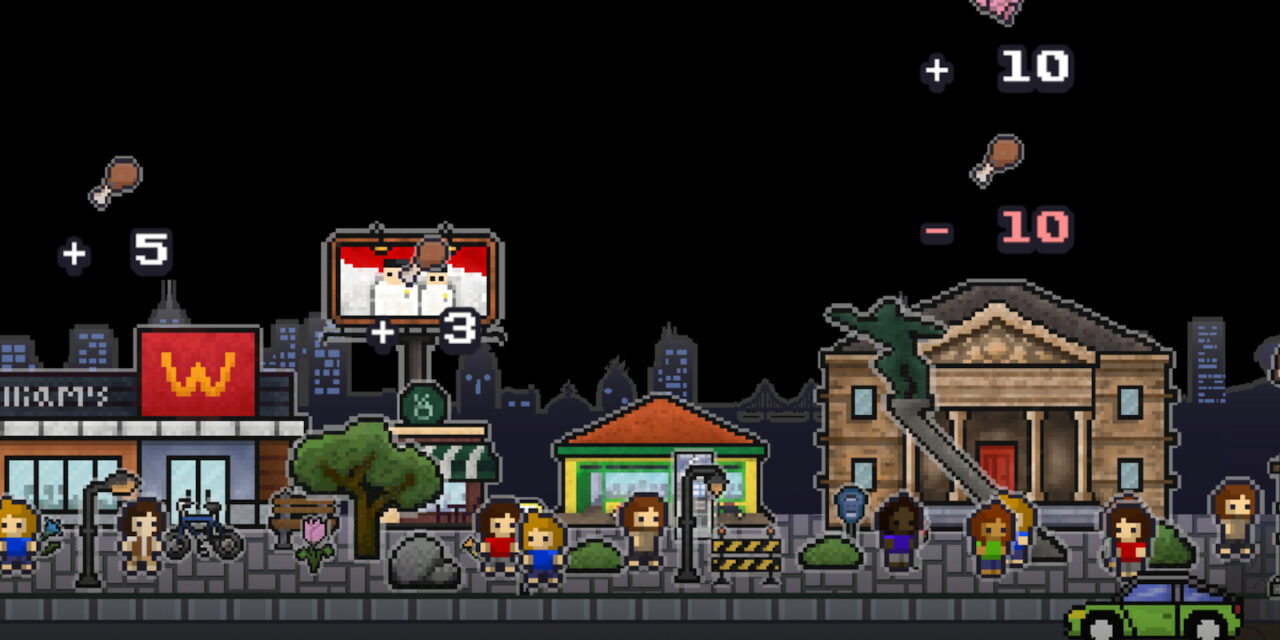
Desktown joins the ranks of cozy idle games that sit on your screen to keep you company. With this one, you have the option of having it sprawl along the lower-thirds of your screen or keep it minimal by compressing it to a widget size. This size can be adjusted so you can have it as prominent or as less intrusive as your needs require. Additionally, if you have multiple monitors, you can choose which monitor you’d like it to be displayed on.
For Desktown, your goal is to create a little universe for your population to thrive. If you have the game fully open, you can see your tiny people meandering along, and you can enjoy the buildings and decorations you’ve put down to the fullest. In widget mode, you’ll see a depiction of Earth with your buildings and tiny people orbiting it.
You’ll have three main resources: population, knowledge, and food. Knowledge and food can only be earned by setting down buildings that will give rewards over a certain amount of time. To get knowledge, you’re placing down libraries, schools, and such. For food, you’ve got things like convenience stores and food stalls.
Population resources vary because you can place down homes to idly contribute toward the population, but you can influence more people to appear by simply typing. This game is fed by typing words, so even when you’re idling, you’re not actually idling. I have Desktown open as I’m typing this, and I’m adding to my population. Technically, I’m idling because I’m working on other things, but it’s treating it as if I’m playing actively.
I will say that in order to enjoy this aspect of the game, you have to be okay with the game acknowledging your keystrokes outside of the game. Development has promised that nothing is stored or sent anywhere, so I don’t see any risk to keeping this feature on. But, for those who don’t like this aspect, you have the option to turn it off.
By turning off the setting, your game will only acknowledge words typed while active in the game, but not outside of it. So, you’ll need to focus on the game to get the added benefits.
Watch the trailer for Desktown!
Personally, I kept the feature on. I love this idea of still contributing toward the game even when I’m focused on other things. I feel like this really ups the ante for when you do check back and see the amount of progress you’ve made.
To keep things interesting, you have the ability to decorate your town. Individual decorations won’t contribute anything except for beautification. However, there are small goals that net you rewards. For instance, if I place down 15 decorations, I’ll get a bonus of 150 people, 300 food, and 75 knowledge. So, it pays in the long run to beautify your space.
Additionally, you can buy satellites. These have different categories like food, public spaces, and urban living. When you buy the satellite, once per day you can type a word that relates to that theme and get a daily reward. For instance, by typing ‘pizza’ for the food, you’ve done it. Each category has 30 English words that count toward that goal.
If you’re used to the normal idle offerings, don’t worry! Desktown has the same basic ones, like a countdown feature, a pomodoro timer, an alarm, and a stopwatch.
Honestly, I think this is a cute little idler, and I love how it has truly idle aspects with building automation, but active participation for using words written while getting work done.
If this seems like something you’d be interested in trying out, you can check out the demo for Desktown over on Steam. If you like what you see, go ahead and pop it on your wishlist since that helps out the developers and keeps it on your radar just in time for the November release! While you’re here, go ahead and check out the other demos we’ve covered, like Adorable Adventures and Clean Up Earth.