
| Quick Verdict: The Turtle Beach Kone II Air mouse is a great gaming mouse with an easy setup and great ergonomics for those who need something larger in their hand. The only downside is that the battery isn’t quite as great as I wanted it to be for the price range. |
| Brand: | Turtle Beach |
| Product: | Kone II Air mouse |
| Review Score: | 8 |
| Cozy Score: | 9 |
| Pros: | Great ergonomics, Easy charge up and setup, improved sensors |
| Cons: | Battery seems a little low compared to other similarly priced mice, scroll wheel occasionally needs to be reset |
| Price: | $119.99 |
In an incremental tech upgrade, it’s not often that you can see differences in the next step. But, the Turtle Beach Kone II Air Mouse seems to be an actual improvement over the previous iteration, the ROCCAT Kone XP Air, and a huge jump over the original Kone Air.
Since Turtle Beach has fully integrated ROCCAT into its lineup of officially branded items, they’re slowly solving a lot of issues they’ve had in the past along with it. And the Turtle Beach Kone II Air Mouse is a perfect example of another stepping stone they’ve landed on.
What’s in the box?
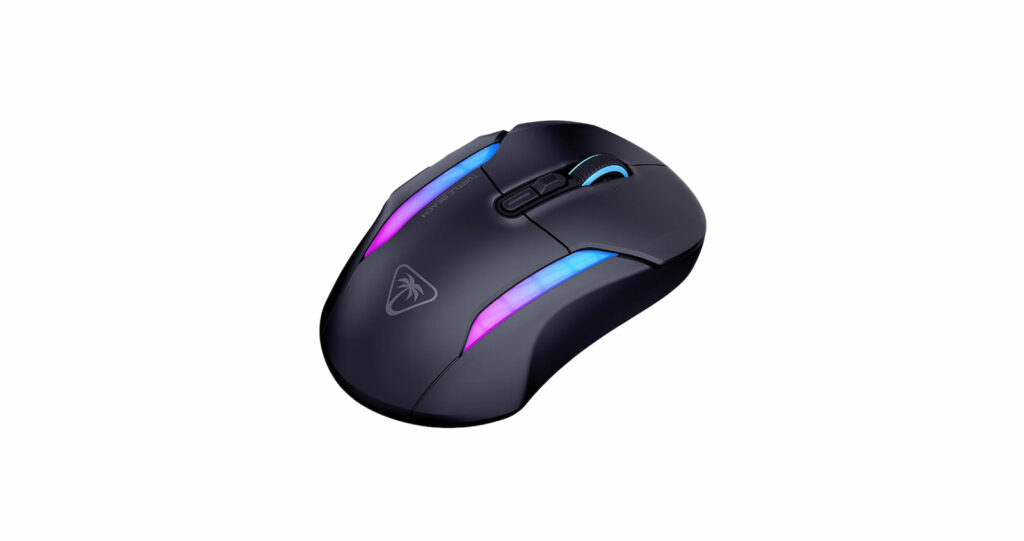
Like most mice at this price range, you’re going to get the works when it comes to the additional accessories included in the Turtle Beach Kone II Air Mouse box.
Not only do you get the mouse itself, but there’s a USB-A transmitter and their PhantomFlex USB-C to USB-A charging cable, as well as a transmitter adapter (if you need it) and grip tape for you to use for the mouse. Honestly, that’s everything you could need.
Something to note is that they did away with the charging dock from the previous Kone XP Air iteration. It looked cool and synced up with the LED light patterns, if you wanted it to, but it always felt unnecessary.
You could plug the transmitter into it to save a slot, but I almost never used it for the actual intent it had: charging. A tiny movement on my desk would have it fall from the dock, so I just used the cord to charge the older version of the mouse.
Doing away with it really doesn’t affect anything in my review and score, other than having to deal with one less piece of hardware on my desk now. But, the original Kone Air didn’t have it either, so it might have been only for the “XP” version.
Set up and use

I think Turtle Beach is slowly learning that the software is as important as the hardware here, because I’ve never had such an easy setup in all of my time reviewing Turtle Beach products. However, ROCCAT has always been easy to set up, and they’re slowly integrating that software into their main catalog.
I’ve used the Turtle Beach Kone II Air Mouse as my main mouse since I got it for review and have no reason to stop currently.
One thing to note is the lack of battery capabilities on the Turtle Beach Kone II Air Mouse. When unplugged, it’s supposed to give up to 130 hours on the wireless function (with 350 hours on Bluetooth).
While I haven’t done a proper count for Bluetooth, wireless mode gives me a little less than 100 hours (maybe 3 to 4 days) before it starts blinking red to let me know it needs to be charged again. So, that “up to” on the specifications is doing some heavy lifting here.
Something I noticed when looking at the specs between the Turtle Beach Kone II Air Mouse and the original ROCCAT Kone Air (and Kone XP Air) is that the sensors are better, going from their Owl-Eye 19K optical sensor to 26K, and offering a maximum DPI of 26,000 (instead of the 19,000 previously).
Another weird issue that I ran into with the old Kone XP Air (and the original Kone Air) that I haven’t had is that the older versions had a defect where the scroll wheel may just suddenly stop working after a while and was not fixable. As an avid doomscroller (and person who just needs to see more than one page worth of a website), that’s an important part of my daily use.
Aside from one small blip that was fixed easily, the scroll wheel is acting perfectly reliably as of the writing of this article.
Is it cozy?

The Turtle Beach Kone II Air Mouse is incredibly ergonomic and is easily one of the most comfortable mice in my hand that Turtle Beach has produced.
That said, I did notice that this iteration is ever so slightly larger than the previous one. The dimensions are a couple of millimeters larger in all respects. That might play into why I like it as much as I do, as I’m a fan of chunkier devices in my hands due to carpal tunnel and shakes. But, if someone needs a small mouse, this ain’t going to be for you.
Final verdict

Honestly, the Turtle Beach Kone II Air Mouse is excellent and well worth being a part of your list for consideration when choosing a new mouse. If you want a gaming mouse with good sensors, great ergonomics, something larger in your hand, and a quick and easy setup, get this one.
You can grab the Turtle Beach Kone II Air Mouse for $119.99 on Turtle Beach’s website. And while you’re here, check out their Victrix Pro BFG Reloaded controller, which happens to be my favorite controller they’ve ever produced.