| Quick Verdict: Cozyrama joins the ranks of diorama building and comes with a ton of items to play with. The only real drawback is that there is no tutorial and I had no clue there were features with the right mouse button when all of them show up with the left. Plus, I lost more than half of my progress after saving. |
| Game: | Cozyrama |
| Developer(s): | Sandwich Games and Tutel Games |
| Publisher: | Frozen District |
| Review Score: | 7 |
| Cozy Score: | 6 |
| Price: | $9.99 |
| Pros: | There are a ton of items that you can scale larger or smaller and spin to face the way you like. You can see other dioramas for inspiration or to play with from other users. |
| Cons: | Anything you make is going to be public; from what I can see, there’s no way to stop that. That could be a plus or a minus depending on your preferences. There was no upfront tutorial, so I had no reason to try the right mouse button, which hid a lot of creative features, and, most egregiously, my diorama didn’t save properly. It was fine when I logged out, but when I logged back in, it had reverted 80% of my progress. |
| Platforms: | Steam |
| Genres: | Building, Sandbox |
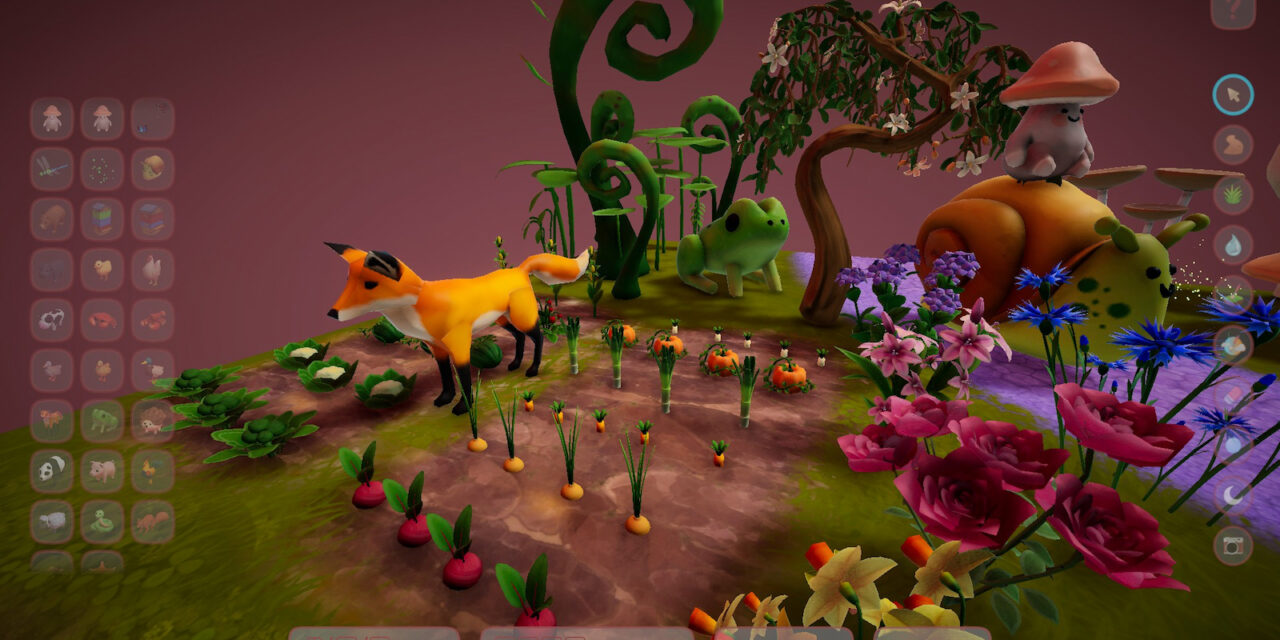
Cozyrama joins the ranks of diorama-building sandbox games. In this one, you’ll be able to choose from two different sizes and enjoy the gentle sway of items. Seeing the movement helps to make the space more alive.
Like most games of this type, you’ve got a selection of items, the ability to make them smaller or larger, change their colors, and the freedom to spin them to face whatever direction you like. I think that Cozyrama has some of the best selections of items, but it does have the drawback of not being intuitive.
I created a whole diorama with all of the customization features working from the left mouse button. Without a tutorial, I had ZERO reason to try the right mouse button. There is an answer key, but because I wasn’t told it existed, I didn’t go searching. That’s my bad, honestly, but you have to make things front and center for players because they don’t know what they don’t know.
I shouldn’t have been able to make an entire diorama and only learn after going back in to fact check something that I was missing an entire feature of the game.
Thankfully, it is super obvious that you can change the color of the sky, the land, the pathways, the water, and the time of day. So, you have some freedom to attune the vibe of the environment, but it’s only with a few optional colors. There’s no gradient scale here.
While building, everything felt very intuitive (aside from the color issue) once I figured out that I could just use the keys to scale up items instead of constantly scrolling with the middle mouse button.
Watch the trailer for Cozyrama!
By this point, I’ve played a few diorama games because they’re certifiably cozy, but I’ve made no secret about the fact that I’m just not that great with these types of games. So, you can take it from me that when things go smoothly, you’ll know about it.
The most unique thing about Cozyrama is that it appears as if you can look at everyone’s builds. There was no option when you saved to keep your builds private though, so if that’s something that’s important to you, it won’t be an option.
I was able to slide into someone’s build and change things around to my liking. If I’m honest, I’m not sure what benefit this serves unless you’re just bored and want to play with a premade base. You won’t override their creation, but rather save a different version of the one you made.
In truth, this was how I learned I was missing something. They had different colors of things in their map and that prompted me to deep dive further.
Admittedly, I can say that not finding the colors was my fault. But the biggest issue is that the diorama that I spent over an hour on didn’t save. Never mind that I saved it several times and double checked that it was good.
When I closed the game, I had a full diorama with a picture taken that showed up in the main area. When I logged back in, the thumbnail was missing and my diorama had rolled back about 40 minutes of progress.
So, if you do make something, I’m not sure it’s guaranteed that it will save properly.
All in all, there are a lot of charming elements about Cozyrama, but it needs a few tweaks before I can say it can join the ranks of games like MakeRoom or even Little Corners.
If you want to give Cozyrama a try, you’ll have to hand over $9.99 because there is no demo to try before you buy. Since my diorama didn’t save properly, I’m not sure I can recommend it until some bug fixes happen. It should be noted that I did get it early, so there might be day-one fixes.
If you want to try something that we can stand behind instead, then click the links above to the other games I mentioned.
Cozy Games Today: 16 new cozy games out on Steam and it’s puzzle heaven! – January 29th, 2026

3 cozy puzzle games on Steam that are a no-brainer to add to your gaming library

Fantastical Parade (B2) – How to earn 168+ free Pokémon TCG Pocket pack hourglasses and 474+ shop tickets from solo battles and missions
Cozy Games Today: 11 new cozy games out on Steam today and one of them is FREE to play! – January 28, 2026
3 cozy music games on Steam that will match the tempo you’re looking for